Video-Based Training: A Practitioner's Guide

Create engaging training videos in 140+ languages.
If you're like me, you're concerned about the amount of screen time you have, perhaps especially so when you receive that weekly notification on your phone. And yet, it doesn't seem like our screen time is going down.
I often hear some version of these concerns from L&D practitioners. There's a tension: should we be adding to that screen time with our training? And is that what employees really want?
Here's my answer: it depends. (Frustrating, I know.) Let me explain.
Video-based training can be effective when it's the right medium for your learning objective and audience. There are decades of learning science research supporting that conclusion.
But video isn't a silver bullet for training. It doesn't magically fix poor learning design. And it can't replace all other training mediums.
With those expectations set, let's talk about when and how video training can be successfully implemented and scaled in your learning strategy.
What is video training?
Before I dive into video training as part of your learning strategy, I want to clarify something. The difference between a video and a video training is the intent.
A video training is intentionally designed to produce an observable change in performance. That means it has a defined learning outcome, a target audience, and evaluation criteria.
I can learn the best way to line a square baking tin with parchment paper from a TikTok video, but that doesn't mean the video's creator intended to teach me that skill. And I doubt they're interested in measuring the efficacy of my tin-lining six months from now.
Types of video training
Now that you know what separates a video from a video training, there's one other thing I'd like to clarify.
There's a difference between instructional approaches and production methods of video training. The former is how the video teaches employees and the latter is how the video is made.
I frequently see people talking about types of video training and conflating those two things (sometimes they even lump in use cases, too). There's a difference between a screencast training video and an explainer training video. One is a production method, the other is an instructional design method.
And I would argue that using language about "types" of video training is becoming obsolete. AI video platforms allow you to mix and match production methods and instructional approaches, whereas previously we were limited by the tech.
When you're deciding to create a video, focus instead on the learning objective you want to drive and then identify which production methods and instructional approaches best serve that outcome.
If you want to learn more about production methods and instructional approaches, click on the accordions below.
Why video training works
Video-based learning is effective because it can combine narration and visuals simultaneously.
Our working memory is limited, and we can quickly saturate a processing channel in our brains.
Imagine you're handed a 30-page SOP. It's a dense, technical document and your visual processing channel gets oversaturated. This is true even for those of us trained to read long, dense documents.
Fortunately, we have another channel available to us: our verbal channel. That's why, if I take that 30-page SOP and turn it into a well-designed training video, I can distribute the cognitive load across the two processing channels. Neither of which competes for capacity. This is true of any well-designed multimodal training, not just video.
I'm describing Cognitive Load Theory, which served as the foundation for Mayer's Cognitive Theory of Multimedia Learning. And it's why L&D practitioners find video a compelling medium for training that requires employees to follow a process or perform consistently, across use cases like onboarding, software training, health and safety, leadership, and product training.
Whether video consistently leads to better learning outcomes than other mediums is still a topic of debate.
When video is the right medium for training
Earlier I said that video training is effective when it is the right medium. Allow me to elaborate.
Video training is particularly well-suited for sequential or procedural learning — if an employee needs to see something demonstrated or performed, step-by-step, it can model the expected behavior and show what "good" looks like. And it can do so consistently.
A good rule of thumb: would an employee benefit from something that is on-demand and can be paused or rewatched?
Video can stand alone as a training or complement other learning experiences, offering reinforcement or application opportunities in the flow of work.
Here are a few examples to illustrate these use cases.
Benefits of video training
I’ve found that the benefits of video that matter to an organization depend on how you evaluate learning. The most important thing is that you do measure something when implementing video training.
Below are examples of benefits we’ve seen with case studies from our customers. The caveat is that these benefits are tied to well-designed video training.
1. Higher completion rates
While it’s not the gold standard of measurement, it's something a lot of stakeholders care about. If you’re investing in video training, you might get asked, are people watching the videos? And more importantly, if you changed training mediums, are they watching the videos more than they were completing the training [in X format]?
In my experience, companies who transition from one medium to video repeatedly find increased completion rates.
Boldyn Networks, a global leader in digital infrastructure, transitioned some of their training to video and found completions jumped, in some cases to 95%.
2. Better knowledge retention
Employees often self-report better learning outcomes with video training. L&D can substantiate that claim by looking at outcomes like reduced errors in a specific workflow or fewer support questions.
That's because employees can see what "good" looks like. There's less room for interpretation than with text-based training. I can precisely describe to managers how to be empathetic in a conversation, but it's different to see that modeled by a person in a conversation.
At Orange, a telecommunications company based in France, the L&D team uses video training to keep corporate and retail employees up-to-date in their ever-evolving industry. They've shared increases in productivity tied to better retention of training material after switching to video training.
3. More consistent delivery
Have you ever facilitated the same training multiple times in a row for different audiences? You can always tell which session you were at your best. Sometimes you're just on. Perhaps you even offer an especially compelling example or someone asks an insightful question.
With video training, everyone gets the same version of the training, every time. That's particularly important when you're localizing content and need to keep one version as the source of truth, even as language and local nuances are adapted.
Northwest Healthcare Properties replaced live training sessions with video, creating more equitable knowledge transfer across their international portfolio.
4. Lower cost per learner
For scaling organizations, there comes a tipping point where the cost of delivering live training exceeds the ROI of its impact. Video training can cost the same to deliver to 10 employees as 10,000.
DuPont found that conventional training methods were no longer feasible at the scale they needed. Their solution was the OpEx Academy, a curriculum of video-based learning playbooks available to employees in the flow of work. By bringing video production in-house, the team saves up to $10,000 per video compared to third-party vendors and creates videos 80% faster.
Challenges of video training
Traditional video training does, however, have its unique set of challenges like any training medium. Here are the main challenges teams face with video training.
1. High upfront production costs
Video production is a complex, multi-step process which can quickly become very expensive regardless of whether you produce in-house or outsource to an external agency. The costs can vary widely depending on type, length, customization, and overall complexity.
For Modern Canada, the price per video was between $5,000 and $8,000, and even more if edits were required.
2. Slow to produce
Aside from being expensive, video production also takes a long time. I've seen training video production timelines that span from a few days to several months, depending on in-house resources and budgets.
Even large multinational companies with vast resources like Heineken take a few days to produce them.
3. Quick to go out of date
Operating procedures, products, and competitive positioning are changing all of the time, and your video will sooner or later be out of date (maybe before you even distribute it), which means expensive and time-consuming reshoots.
This was a notable pain point for Criteo, which resulted in them re-doing a large chunk of the video production cycle including flying in experts, shooting, editing, and re-editing.
4. Costly to localize
Script translation, subtitles, and voiceover recordings are an additional expense and time commitment, often multiple months, for organizations that want to offer their video-based learning in multiple languages.
For a company like Novelis, that could mean a substantial budget. They estimate having spent close to $1,000,000 on a training video production run across 8 languages.
How AI is changing video training
The challenges I just mentioned may be the reason you aren't using video training today. I get it. The last time I created training videos using traditional production methods, it was expensive and so slow. It took months to turn around ten short videos before dubbing for global audiences, and the production costs were significant.
But if you're here because you know video is an effective medium and you just wish it were easier to use, especially in-house, there's good news. AI video platforms like Synthesia are transforming how you should think about video training, starting with what it takes to create and maintain a video.
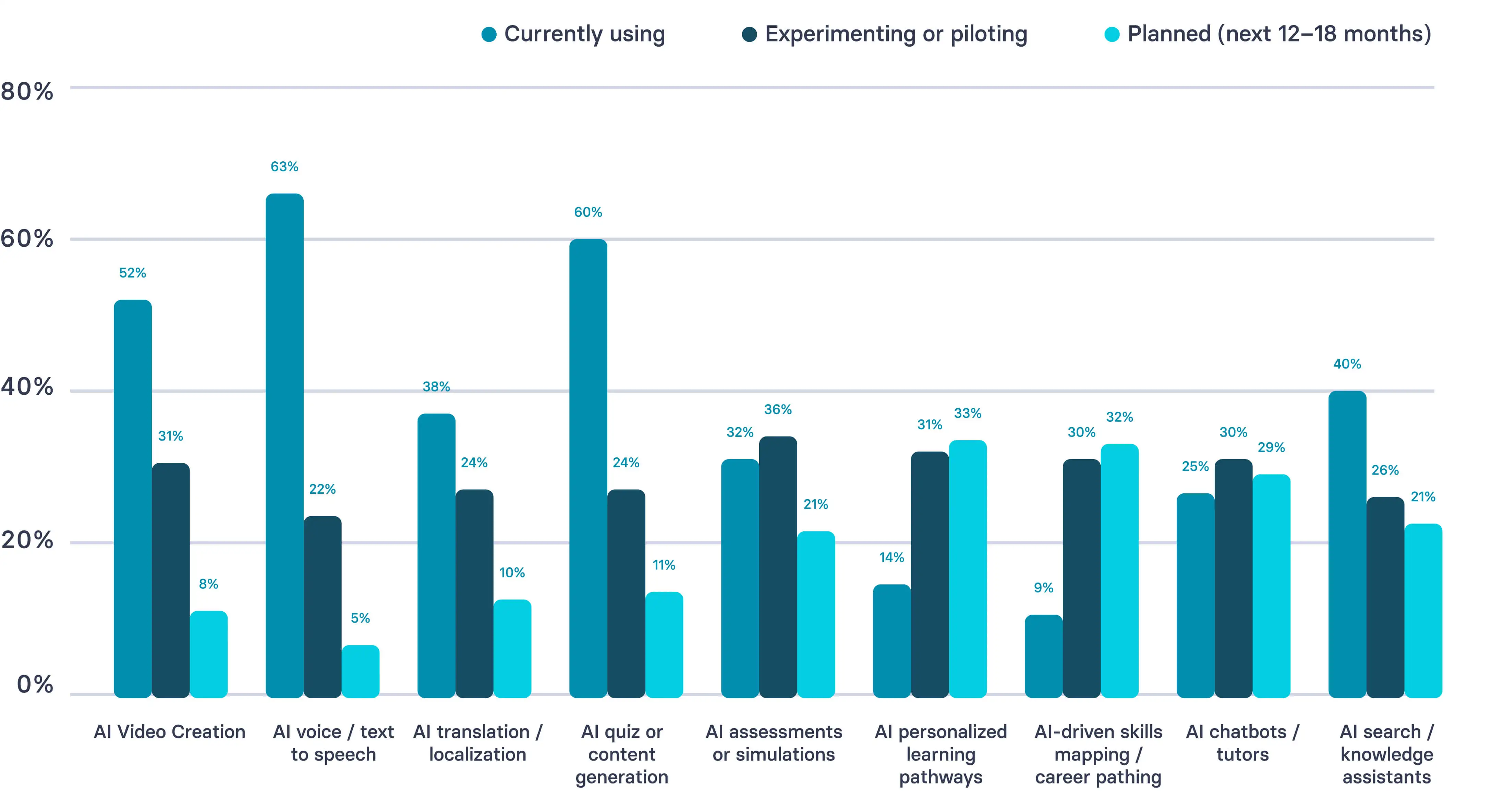
According to Synthesia's AI in Learning & Development Report 2026, 52% of L&D teams are currently using AI to create videos, and 39% are either piloting or planning to use AI for video creation in the near future.
In my opinion, the biggest blocker to using video for training has always been the production process. If you don't have the equipment, editing software, or a deep knowledge of Adobe Premiere, you've probably been limited to the video functionality embedded in eLearning authoring tools.
AI has transformed the creation process. Let me show you what I mean by walking you through two different workflows: creating a traditional training video and then creating a training video with AI.
How to create a traditional video training
I know I've said this multiple times in this post, but good training videos are grounded in effective learning design. So please, follow whatever instructional design process works for you. This workflow presumes you've already conducted a needs analysis and are ready to design and develop your video.
Preferably, you'll be able to complete these sentences before you begin:
This video is for [specific role] who currently [context or gap]. After watching, [specific role] should be able to [observable action] so that [business outcome].
If you think this is silly or reductive, bear with me. These two sentences don't have to be shared with anyone, but they are a way for you to evaluate your video. The number one mistake I see with training video creation is skipping over the last clause, assuming you'll figure it out later.
Step 1: Write your script
Now that you know what you’re building, it’s time to write your script. Training videos need to be focused, which is why I recommend incorporating these five components into your script:
- Hook: Why is someone spending their precious time on this training?
- Outcome: What will someone be able to do immediately after?
- Steps: The minimum number of steps to complete the task or make the decision (if relevant)
- Pitfalls: Common mistakes and how to avoid them (if relevant)
- Next action: What someone does next, and how they get help if needed
Always read your script aloud, or have Google Docs do it for you. You’ll catch any awkward phrasing when you listen to it (just trust me). The remedy is usually active verbs and simpler language.
Step 2: Plan your scenes
With your script drafted, you’re ready to plan your scenes. If it is helpful, think about scenes like a slide in a deck. You want one idea per scene (or slide). This is also the time to sketch out (not literally, unless you like storyboarding), where you’ll embed different multimedia elements, like a process walkthrough that an SME recorded as a screencast.
If you’re working with a production company, you’ll likely handoff development at this point. Don’t forget to share all of those scene assets, as well as any branding or supporting documentation they may need (like how to pronounce your company’s name correctly).
Step 3: Build your video
Once everything is ready, you can start building your video following your tool's dedicated workflow.
I highly recommend investing in a quality microphone, making sure you have a noise-free environment as much as possible, and double-checking the quality of your lighting and internet. If you're recording yourself, keep your appearance consistent across all recording sessions. It's distracting when someone changes outfits or hairstyles mid-video.
Whatever you do, set aside time for piloting the video with a small group of your target audience. That way, you can incorporate any feedback and make the necessary revisions before you finalize the video. Always come back to your learning objective. If something is tangential, cut it.
If you're struggling to figure out what isn't working with your video, go through our FOCA framework checklist.
Step 4: Publish and iterate
Once the video is ready, you can decide how to publish it and manage revisions. Our Academy team refers to this as the publishing triangle:
- Surface: Where will the video live, and how will people find it?
- Security: Who will have access, and what happens when it's shared?
- Stability: How will you update content without creating confusion or outdated versions?
Each of these decisions will also impact your measurement goals (more on that in a bit).
How to create an AI video training
If you're using an AI video platform like Synthesia to create your training video, the workflow still starts with your needs assessment and defining your learning outcome. It's not mandated in the system, so just promise me you'll do it, okay?
From there, everything else changes, including how you get started. Many of our customers aren't writing their own scripts anymore. They're generating a first draft by uploading existing materials like a slide deck, a PDF, or a transcript from a live session, or by chatting with our AI assistant.
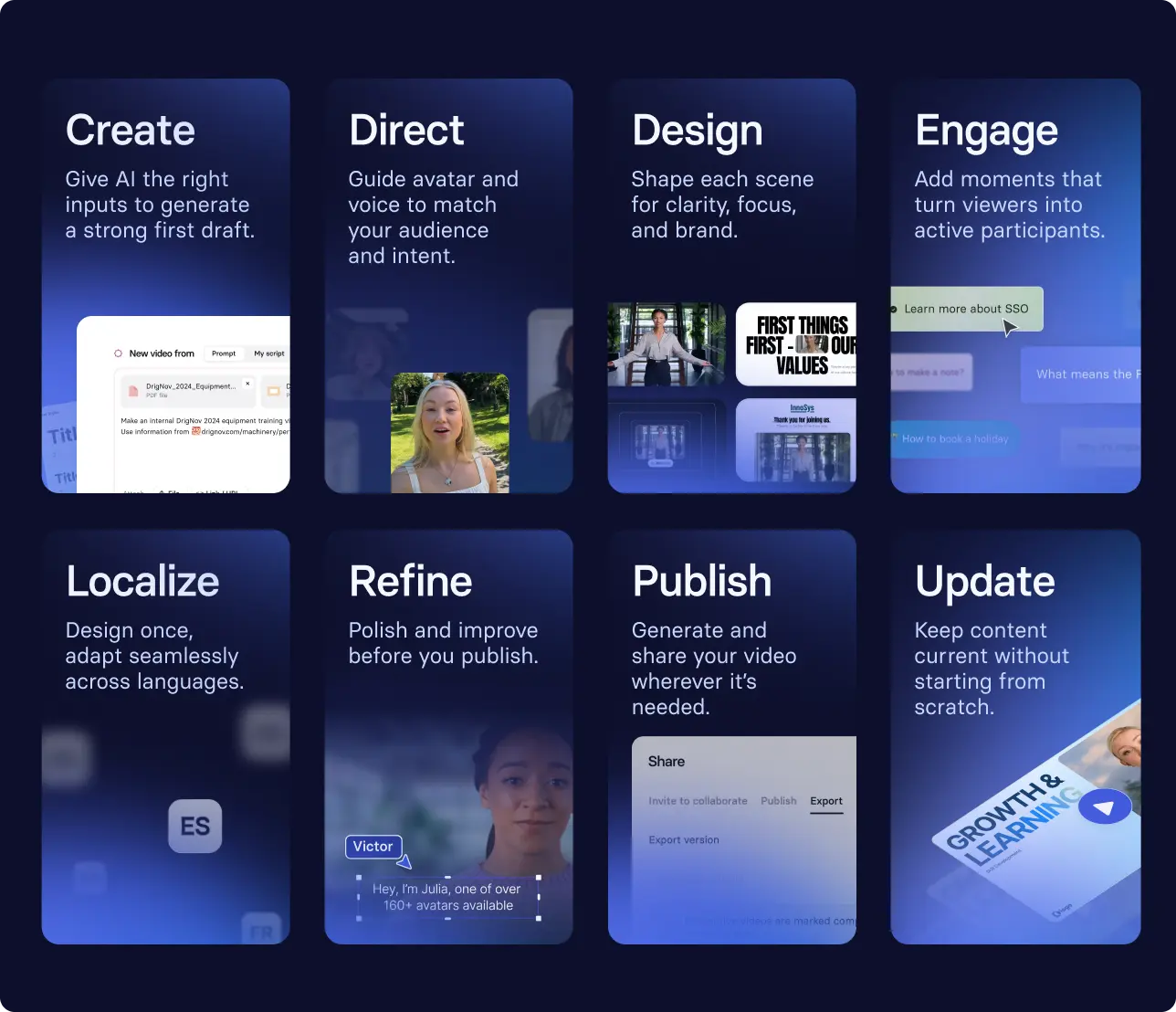
Here's what that workflow might look like:
- Uploading a slide deck from an existing training to our AI video generator to get a first draft
- Selecting an avatar and updating their outfit, backdrop, and voice to match your working environment
- Adding a knowledge check at a key decision point so learners can confirm what they should do next
- Making revisions before localizing into three languages
- Publishing and sharing the video, and updating in minutes when anything changes
While you can still treat video creation as a linear process with checklists and all, it's really up to you. You can see how this workflow comes together in the video below.
Or, get started with a template
That being said, some of our customers prefer to get started using a template. If you're new to video as a medium for training, our templates library is a good place to start. Templates are customizable and give you a tested structure to work from, so you can focus on the learning objective. Enterprise clients receive a custom branded template.
Measuring your training video
Once your video has been published for a significant amount of time, it's time to evaluate whether the training is working.
When I say significant, I mean a time period relevant to your learning objectives. If you ship a training video on performance reviews for managers, you probably have a specific timeframe when you'd expect managers to watch it. With other training, significance may be more fluid, in which case use a consistent benchmark like a quarter.
That starts with returning to those two sentences:
This video is for [specific role] who currently [context or gap]. After watching, [specific role] should be able to [observable action] so that [business outcome].
With those sentences, you can identify the information you need to evaluate the training:
- The observable behavior the training was designed to change or impact
- Two signals of that behavior: one leading indicator (something you observe during or after the training, like an assessment score), and one lagging indicator (something that shows up in daily work)
- A proxy measurement for the business outcome
Let's say you have a group of new hires who go through a training video showing them how to complete a key workflow. The behavior you want to change is their ability to complete the workflow without reaching out on a support channel.
Your leading signal is whether they can correctly complete a workflow scenario in a knowledge check, and your lagging signal is their ability to correctly complete the task on the job. The business wants these new hires onboarded to meet a KPI, so their time to productivity is a proxy measure here.
With these inputs you can determine and report on your training ROI, because ultimately that’s what matters.
Amy Vidor, PhD, is the Learning and Development Evangelist at Synthesia, where she researches learning trends and helps organizations apply AI at scale. With 15 years of experience, she has advised companies, governments, and universities on skills.


.webp)