




The 10 Best AI Avatar Generators in 2026 (Tried & Tested)

Create AI videos with realistic avatars in 160+ languages.
AI avatar generators have a range of use cases, with three of the most common being creating marketing videos, UGC-style social ads, and easy-to-update training videos for L&D teams.
I've spent a week or so running the same script (in English and Spanish) through all of the major AI avatar tools and then playing around with each platform's features in order to work out which is the best.
I've judged each tool based on realism, lip-sync quality, voice quality, localization capabilities, and how easy and affordable it is to create and edit videos. I go into these criteria in more detail below.
I've ordered my list by overall performance, but I've also highlighted which AI avatar tool is best for each use case. I've tried to be upfront about each tool's downsides and trade-offs.
Most 'best of' lists are written by people who've never actually used the tools, but I've done the work and have provided you with real video examples from each tool so you can see (and decide) for yourself.
If you're looking for the best AI avatar generation tool, then this is the guide for you. Watch the video below to see a side-by-side comparison of each tool.
Quick Picks
- Best for enterprise training, enablement, and internal comms: Synthesia
- Best for social, marketing, and personal-branding video: HeyGen
- Best for UGC-style social ads: Creatify
- Best all-in-one video editor with avatars: VEED
How I evaluated these AI avatar generators
To ensure a fair comparison I have scored each of the AI avatar generators in this list across five criteria. I've weighted each criterion based on how much I think each impacts the quality and usability of a finished video.
I spent roughly one hour with each tool testing both English and Spanish scripts.
- Avatar realism (35%): How realistic are the avatar's facial expressions, blinking, head movement, and hand movement?
- Lip-sync accuracy (20%): How well do the avatar's mouth movements align with the voice?
- Voice quality (15%): How natural do the pacing and intonation of the AI voices feel?
- Localization and language range (15%): How many languages does the platform support and how good is the quality of the translated videos?
- Editing, workflow and re-edit cost (15%): How much control do I have over the final video, how fast could I go from input to usable video, and how much does it cost to make changes to a previously generated video?
1. Synthesia
Quick summary
- Avatar realism: High
- Lip-sync accuracy: High
- Voice quality: High
- Languages: 160+
- Cheapest paid plan: $19/mo (Starter)
- Best use case: Training, enablement, comms, and any team that edits videos repeatedly
- Biggest limitation: Slower rendering
I think Synthesia deserves the top spot due to a combination of avatar realism, control, and price. It's the cheapest option on this list aside from D-ID, so you're getting top-tier realism at the 2nd cheapest price point. Synthesia is used by over 90% of the Fortune 100, so they must be doing something right.
For quite a long time HeyGen has been the avatar generator that most people point to as the most realistic, and until recently I think that was a fair call.
However, with Synthesia's new Express-3 avatars I think that gap in realism has closed. When comparing the best HeyGen avatar (HeyGen's V series) to the best Synthesia avatar (Express-3), I couldn't see any meaningful difference, and in a blind test commissioned by Synthesia, viewers actually preferred Synthesia's top avatars to HeyGen's 7 times out of 10.
But don't take my word for it, the side-by-side clip below shows both platforms performing the same script so you can judge for yourself:
There's even an option to direct your avatar to take actions in scenes that you prompt, which I think expands the type of videos you can make with AI avatars massively. It moves the whole format beyond talking-head videos and toward something more dynamic.
Synthesia's AI voices are another strong point. The platform offers more than 1,000 AI voices, and they all sound very natural with intonation that feels very close to real speech (I tested in both English and Spanish).
When it comes to daily use, I found that Synthesia has two strengths that set it apart.
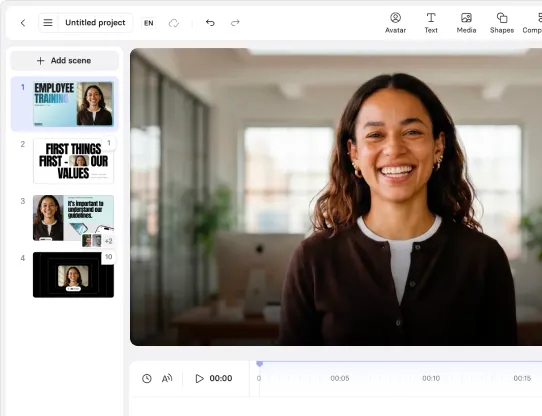
First, editing a video is easy and affordable. Synthesia offers a true multi-track timeline rather than just orderable scene cards, and the platform only charges you for the seconds of your video that you actually change, rather than regenerating the entire clip and billing you for all of it. This allows you to iteratively edit and improve your video, which is my preferred way of working.
Second, in Synthesia a minute is a minute regardless of which avatar you pick. You obviously want to use the most realistic avatar that a platform has to offer, and in Synthesia your allowance doesn't shrink when you use the highest-quality avatars.
When you combine these strengths with the easy-to-use slide-based editor, some really nice document-to-video workflows, the new AI assistant, directable avatars, and the option to generate B-roll with a range of AI video creation options (Veo 3.1, Gemini Omni Flash, Flux 3), I think Synthesia is the most reliable and predictable AI avatar generator to create and maintain a library of avatar-led videos in.
Strengths:
- New Express-3 avatars have very strong realism, lip-sync, and natural hand movement, and were preferred over HeyGen's top avatars 7/10 in a blind test
- Re-edits only charge the seconds you change, with no full re-renders required and therefore no surprise credit burn
- True multi-track timeline editor
- Flat-rate minutes regardless of avatar choice (including the latest Express-3 avatars)
- One-click translation of any Synthesia video into 160+ languages
- Document / webpage / script / prompt starting points with the platform's AI Assistant
- Directable avatars
- Easy-to-use workflow lets you create a personal avatar from a photo or a short recording
- AI Playground B-roll (Veo 3.1, Gemini Omni Flash, Flux 3) and AI-generated motion graphics
- Strong enterprise controls, brand safety, and compliance (SOC 2 Type II, ISO 42001, GDPR)
Limitations:
- Rendering is on the slower side versus the fastest tools here
- No Safari support on desktop (Chrome and Edge only), and a limited mobile experience
My verdict
Synthesia is the strongest all-round avatar platform for teams that are producing videos regularly and who need to update and maintain a content library over time (think training, enablement, and internal comms). Synthesia offers top-tier realism along with the lowest re-edit cost and pricing that is the most predictable of any of its peers.
If you are looking to create UGC-style ads for performance marketing, or if you want to create marketing videos for social, then I still think that Creatify or HeyGen might be a better fit, but I think that gap is closing as Synthesia starts to cater to those use cases too. For example, its new avatar builder tool makes it a much more useful tool for social content.
2. Creatify
Quick summary
- Avatar realism: High
- Lip-sync accuracy: High
- Voice quality: High
- Languages: Multilingual (manual translation)
- Cheapest paid plan: $39/mo (Starter)
- Best use case: Performance ads
- Biggest limitation: No automatic translation
I'm a big fan of Creatify's avatars — they are almost indistinguishable from real-life UGC videos that you'd scroll past on social media. They demonstrate a high degree of expressiveness and emotion that makes them a really great fit for Creatify's core use case (UGC-style ads for social media). The lip-sync timing is also very accurate and there's a wide variety of avatars (more than 1,500 with a range of emotional presets).
I tried out localizing my English video into Spanish and the avatar performance held up very well too.
The whole Creatify platform is built around the performance marketing use case and comes with built-in tools for batch generation of ad variations, A/B testing, ad analytics, and direct publishing to Meta, TikTok, and other ad platforms.
Strengths:
- Industry-leading UGC-style realism with expressive delivery
- Purpose-built ad toolkit including tools for batch mode, A/B testing, analytics, and ad-platform integrations
- Wide variety of stock avatars with emotional presets
- Consistent quality when localizing into other languages
Limitations:
- No automatic script translation, so you have to build each language version manually
- Free plan is very limited and doesn't really let you test the platform
- Creatify is very geared toward the UGC-style ad use case, but it's overkill for simple avatar videos
- The vertical-first output neglects other formats and limits flexibility
My verdict
If you want to use AI avatars in UGC-style ads or social content, then Creatify is definitely the best option. It's very geared toward that use case and offers specialized workflows to help you. The avatar realism and lip-sync are very strong.
If you're looking to create avatar videos for other use cases, such as training, internal comms, or non-UGC-style marketing videos, then it might not be the best fit, and it's definitely overkill for a simple avatar video.
3. HeyGen
Quick summary
- Avatar realism: High
- Lip-sync accuracy: High
- Voice quality: High
- Languages: 175+ languages
- Cheapest paid plan: $29/mo (Creator)
- Best use case: Social, marketing, and personal-branding video
- Biggest limitation: Re-edits and premium avatars burn credits fast
HeyGen's avatars look great, with a level of realism that places them firmly among the top three alongside Synthesia and Creatify. They are expressive, show natural facial movement and body language, and also benefit from small touches including natural posture shifts, blinking, micro-gestures, and hair movement.
HeyGen's main use case is creating social, marketing, and personal-brand videos, which is why their stock avatars tend to be in more relaxed settings and postures, such as leaning across a desk, sitting cross-legged on a sofa, or leaning against a kitchen work surface.
HeyGen's lip-sync is also highly accurate, and stayed consistently strong throughout my testing.
The platform is often particularly praised for its personal avatars (avatars you can generate yourself from a selfie or a short video), which are quick and easy to create, and preserve the likeness of the subject really well.
HeyGen is primarily built for content creators and agencies who want to make realistic talking-head avatars for social and marketing videos, and for that use case I think HeyGen is a great fit.
HeyGen does, however, have its drawbacks.
The biggest problem I had with HeyGen was with the cost of editing videos I have already generated, which is a pretty common task when you are creating and updating videos on a regular basis.
HeyGen charges you credits every time you change a finished video because every edit will re-render the entire scene from scratch (Synthesia only charges for any increase in the video's length). If you're on the $29/month Creator plan that means you're going to run out of credits very quickly.
The re-editing issue is a common complaint among HeyGen users, who typically find they'll end up spending closer to $50/month rather than the advertised $29/month Creator plan once they factor in the cost of additional credits needed for typical re-edits.
Another issue I ran into while using HeyGen was that if you want to use the top-quality avatars (which we all do) you burn credits much faster. On the $29/month Creator plan it says you get 30 minutes of video, but if you're using the latest Avatar V model that really means about 12 mins of allowance.
Another common complaint that I also experienced was poor reliability in video generation — specifically stuck renders and timeline glitches. This was especially common on longer videos, and the failed renders still burn credits, which is pretty frustrating. When I contacted HeyGen's support about this they were unhelpful.
Strengths:
- Top-tier expressive avatars with realistic hand and hair movement
- Accurate lip-sync
- Fast and easy avatar creation (~15s) and quick video rendering
- Clean and approachable UI that makes it easy to create videos
Limitations:
- Re-editing costs: any change to a generated video will re-render the whole scene and charge your credits, which means a $29 plan can effectively run closer to $50/month once you factor in edits
- The most realistic avatars cost several times more credits per minute than the cheapest ones. The minutes on the pricing page assume the low-quality models (the $29 Creator plan gives you only ~12 minutes with the most realistic avatars)
- Stuck renders and timeline glitches are common (especially on longer videos)
- User support is frequently flagged as unhelpful
My verdict
HeyGen is one of the best avatar platforms available, with some of the most realistic avatars and the most accurate lip-sync.
It's a good choice if you are looking to create avatar-led social, marketing, or personal-branding videos, or if you just want a quick and realistic talking-head video of yourself.
The biggest catch with HeyGen is the cost creep, in that the advertised minutes assume the cheapest avatars, and re-editing your videos results in a re-render (and a re-charge) of the whole scene. The result of these two issues is that your real monthly spend is likely to end up well above the listed price if you want to use the realistic models or iterate a lot.
4. AI Studios
Quick summary
- Avatar realism: Medium
- Lip-sync accuracy: Low
- Voice quality: Low
- Languages: 150+
- Cheapest paid plan: $29/mo (Personal)
- Best use case: Social, product, and explainer videos
- Biggest limitation: Avatar realism isn't as good as the top-tier platforms
AI Studios offers decent-quality AI avatars, but the realism definitely sits a level below the top three (Synthesia, Creatify, HeyGen). While the avatars do demonstrate natural body motion I think they are let down by a noticeable delay in lip-sync, unnatural-looking facial movements, and flat-sounding default voices.
The platform has an enormous offering of more than 2,000 stock avatars which all support multi-avatar and conversational scenes, and they also have a unique manual gesture control feature that lets you script precise avatar movements, which I haven't actually seen available on any other avatar platform.
Strengths:
- Huge 2,000+ avatar library with a wide variety of avatar styles
- Manual gesture control for precise avatar movements
- Support for multi-avatar and conversational scenes
- High-quality visual output
Limitations:
- Slightly artificial-looking facial movement, especially around the eyes
- Weak and flat-sounding default voices (you only get access to ElevenLabs voices on the higher pricing tiers)
- Noticeable lip-sync delays, which ruin immersion
- Poor-quality output and slower video rendering in non-English languages
My verdict
AI Studios gives you a massive library of stock avatars and a unique gesture control feature, but it definitely trails the leaders on realism and natural delivery.
The broader platform contains a wide variety of AI video tools, so maybe it's a good choice if you want a decent AI avatar generator bundled with some broader AI video functionality, but otherwise I don't see why you would pick it over the top three in this list.
5. VEED
Quick summary
- Avatar realism: Medium
- Lip-sync accuracy: Medium
- Voice quality: Average
- Languages: 120+
- Cheapest paid plan: $25/mo (Creator)
- Best use case: Projects that need both editing and avatars
- Biggest limitation: Strange avatar movements
I wouldn't say VEED's avatar realism is top-tier, but it's not bad. The output can look pretty clean and professional, and I found the lip-sync to be fairly accurate and stable across multiple generations. The platform's video rendering is also fast and reliable.
However, VEED's real strength is the video editing platform around the avatar functionality. It's a fully-featured timeline-based editor with a large B-roll, layout, and editing toolkit.
I had a bit of trouble with VEED's AI voices, which I found to be a bit robotic and lacking emotional depth. During my testing I also had a few incidents where my avatar would make unnatural head movements that forced me to regenerate the scene.
Strengths:
- An easy-to-use and fully-featured timeline editor with useful tools for B-roll, layouts, and subtitles
- Avatar output that is often professional-looking
- Fast rendering
- Strong content-repurposing workflows
Limitations:
- Robotic AI voices that lack emotional depth
- Avatars will often make unnatural head movements that weren't prompted in the script, which are frequently bad enough to require regeneration.
- A relatively small stock avatar library when compared to other avatar-first platforms
My verdict
VEED is a powerful video platform that is built around editing rather than AI avatars. That probably explains why the avatar functionality doesn't feel competitive on realism or expressiveness.
If you really want to use VEED for video editing and also use AI avatars in your video, then I'd probably suggest generating your avatar in one of the more realistic AI avatar generator tools and then importing the video into VEED afterward.
6. Elai
Quick summary
- Avatar realism: Medium
- Lip-sync accuracy: Medium
- Voice quality: Average
- Languages: 100+
- Cheapest paid plan: $29/mo (Creator)
- Best use case: Content repurposing
- Biggest limitation: Robotic AI voices
Elai's strengths include its lip-sync, which I found to be consistently accurate and natural across my test videos, and realistic avatar facial micro-movements.
The Elai platform places a lot of emphasis on its document-to-video workflows, including URL- and PPTX-to-video, but I think similar workflows available in other platforms do a better job.
Elai's video rendering speed should also get a special mention — it's very fast.
Strengths:
- Accurate and natural lip-sync with pleasing micro-movements
- Extremely fast rendering
- Decent document-to-video workflows (URL/PPTX-to-video)
Limitations:
- Flat, robotic voices lacking emotional depth (I found these to be even worse in Spanish)
- Avatars that lack expressiveness, especially when compared to the top-tier AI avatar generators
- Avatar movement that feels restricted with hands that are often out of frame
- Visible compositing artifacts where avatar hair meets the background
My verdict
I think that Elai's relatively weak avatar realism prevents it from being an obvious match for a specific use case. I found the flat and unexpressive AI voices and the restricted avatar movement to be serious blockers for using this platform. The one strength of the platform that I'd highlight is the rapid video generation.
7. Colossyan
Quick summary
- Avatar realism: Low
- Lip-sync accuracy: Medium
- Voice quality: High
- Languages: 80–100+
- Cheapest paid plan: $89/mo (Professional)
- Best use case: Corporate training
- Biggest limitation: Weak avatar expressiveness
Colossyan uses an easy-to-use slide-based editor that feels like PowerPoint, and offers more than 300 stock avatars with options for custom avatars and voice cloning. The AI voice quality is quite good with natural-sounding voices.
As an AI avatar generator it is unique in that it offers 4K video export even on the free plan.
The platform is heavily targeting the enterprise training use case, which is also a popular use case for Synthesia. So it's no surprise that Colossyan boasts a strong L&D toolkit including support for interactive quizzes, branching scenarios, and SCORM exports.
However, I feel that Colossyan is largely let down by weak avatar realism. The avatars lack expressiveness, and often demonstrate rigid and unnatural movements, with some facial animations in particular looking very strange and ruining immersion.
Strengths:
- Strong L&D tools including support for branching scenarios, quizzes, and SCORM export
- Easy-to-use slide-based editor
- 300+ avatars with support for custom avatars and voice cloning
- Good-quality AI voices
- Support for limited 4K exports on the free plan
Limitations:
- Rigid and unnatural avatar movement with weak expressiveness
- Facial animations that look unnatural (especially around the mouth)
- Frequent issues with slow and freezing video rendering
- Audio artifacts encountered when generating dialogue in Spanish
My verdict
I think Colossyan is a potentially strong option for learning and development (L&D) use cases, but it is let down by avatars that are sufficiently unrealistic and unexpressive to the point that I think a learner would find them a distraction from the actual content of the video, which is too big an issue to ignore.
8. D-ID
Quick summary
- Avatar realism: Low
- Lip-sync accuracy: Medium
- Voice quality: High
- Languages: 120+
- Cheapest paid plan: $5.90/mo (Lite)
- Best use case: Basic photo-to-avatar videos
- Biggest limitation: No avatar expressiveness
D-ID's only real strengths are that it renders avatar videos extremely fast (on average within 15 seconds during my tests), that its AI voices sound clear and natural, and that it offers the cheapest paid plan on this list (at $5.90/month for the Lite plan). I'd also highlight the support for sentiment presets like "Friendly" or "Professional," which make it easy to set a tone that matches your video with one adjustment.
The platform is largely built around turning a photo into a talking avatar, but I don't think it's the best AI avatar generation tool for that.
In terms of drawbacks, I found that D-ID's avatars have really unrealistic mouth movements that are quite distracting, and I'm also not a fan of how every D-ID avatar that I tested seemed to use a very tight camera that means you can't see any hand or body movement.
Strengths:
- Very fast rendering
- Clear and natural-sounding AI voices
- Presets that offer basic sentiment control
- Offers the cheapest entry point on the list ($5.90/mo)
Limitations:
- All the avatars have very tight camera framing which leaves no room for hand gestures or full-body movement
- Very limited scene, layout, and camera control
- Mouth movements that look unrealistic and distracting
My verdict
I think that D-ID's avatars' low level of realism prevents it from being a serious consideration for any use case. The main reason I can see to choose it would be if you want a quick talking-head video, are relatively indifferent to output quality, and you want the cheapest price point possible.
9. Camtasia
Quick summary
- Avatar realism: Medium
- Lip-sync accuracy: Medium
- Voice quality: High
- Languages: 7
- Cheapest paid plan: $599/yr (Pro, annual only)
- Best use case: Screen-recording videos
- Biggest limitation: Weak avatar expressiveness and narrow language support
Camtasia is best known as a screen recording tool, but they have recently added support for AI avatars with a script-based editor. The AI voice quality is good (I think they are using ElevenLabs AI voices), and the AI avatar output is probably suitable for use in professional settings.
Camtasia is a desktop application so it renders your video locally. That can either be a positive (if you have a powerful computer) or a negative (if you don't), but one upside is that it allows you to work offline.
I think that's more or less where the positives end, as I found that the Camtasia avatars almost completely lack expressiveness and demonstrate no hand or full-body movement. You'll also need to shell out for the $599/year (there's no monthly payment option) Pro plan to get access to any AI avatar functionality.
The language support is also very limited with only 7 languages available.
Strengths:
- High-quality TTS voices
- Clean and professional output
- Local rendering can be fast
Limitations:
- Avatars almost completely lack expressiveness, with no hand or full-body movement
- Small avatar library with no camera or pose control
- Supports only 7 languages and no dialect or accent variation
- Full avatar features require buying the higher-tier plans
My verdict
Camtasia is a deservedly popular tool for screen recording videos, but the avatar features feel bolted on and aren't competitive with the dedicated AI avatar tools on this list.
The very limited language support is a definite blocker if you're hoping to make videos in a variety of languages, and for me the pricing and the fact it's a desktop application are also major reasons why I wouldn't choose to purchase this tool.
If I needed screen recordings in an avatar-led video I'd most likely choose a more realistic AI avatar generator platform that offers an AI screen recorder tool.
10. Vyond
Quick summary
- Avatar realism: Low
- Lip-sync accuracy: Low
- Voice quality: Low
- Languages: 80+
- Cheapest paid plan: $99/mo (Starter)
- Best use case: Animated storytelling
- Biggest limitation: Low avatar realism
Vyond is an animation platform in which the user selects from a large library of pre-made animated characters, props, and backgrounds. Vyond's primary use case is creating animated videos for corporate training. Vyond is widely considered one of the best tools for creating animation-style videos.
The platform recently added AI avatars but they are probably the weakest in this list in terms of realism, lip-sync, and AI voice quality. I also found the video rendering time to be excessively long during my testing.
The cheapest paid plan is $99/month, which is relatively expensive compared to the other AI avatar tools on the market, and doesn't make sense given the low quality of the avatars.
Strengths:
- Large library of 1,100+ animated avatars
- Strong corporate animation and storytelling tools
Limitations:
- Least realistic avatars on the list with a noticeable uncanny-valley effect
- Poor lip-sync that degrades on longer sentences
- Robotic voice with unnatural pauses that are even flatter in Spanish
- Slow rendering and export
- High $99/mo entry price for the quality delivered
My verdict
Vyond's AI avatar realism leaves a lot to be desired and the pricing also feels very high relative to the output quality. While Vyond might be a good choice for creating animated videos I don't see why anyone would choose it for any avatar video use case.
How do these AI avatar generators compare?
Decision framework: which AI avatar generator fits your use case?
So which AI avatar generator tool on this list is the best option for you?
The answer depends almost entirely on what you want to create. To help you decide, I've provided a breakdown of the best tools by use case below.
- If you need enterprise training, enablement, or internal comms: I'd recommend Synthesia because it gives you top-tier avatar realism, video creation in 160+ languages, AI-generated motion graphics, interactivity, SCORM export, brand and compliance controls, and directable avatars.
- If you edit and re-version videos often: I'd recommend Synthesia, because when you edit a previously generated video Synthesia only charges you for the increase in the video's total length, which makes re-editing much more affordable.
- If you make social, marketing, or personal-branding video: I'd recommend HeyGen because it gives you a quick and easy route to creating a realistic talking-head version of yourself, brand kits, and one-click translation all on the $29/month plan. Just be sure to watch your credit spend if you iterate a lot.
- If you're an agency producing content for clients: I'd recommend HeyGen if your agency work requires marketing or social videos, and Creatify if you need paid social video ads that would benefit from features like batch generation of ad variants and A/B testing.
- If you need UGC-style performance ads: I'd recommend Creatify because they offer realistic, UGC-style avatars as well as batch ad generation, A/B testing, and direct publishing to platforms like TikTok and Meta.
- If you need precise, scripted avatar movement: I'd recommend AI Studios because of its manual avatar gesture control feature.
- If you need a full editor with avatars on top: I'd recommend VEED, because it's a full-featured and easy-to-use video editor which also offers avatars. If avatar realism is important, then I'd probably suggest Synthesia instead.
- If you need quick video rendering: I'd recommend Elai because it has the fastest video rendering of any tool on this list.
- If you need interactive L&D training: I'd recommend Synthesia because it allows you to add a full range of interactivity to your video including branching scenarios, quizzes, CTAs, and clickable hotspots. It also has full support for SCORM which allows you to track learner completion, progress, and quiz scores directly in your preferred LMS. Colossyan is another option with solid support for interactivity too.
- If you need a cheap, fast photo-to-avatar clip: D-ID is the cheapest option at $5.90/mo, or for better-quality avatars go with Synthesia for 3 personal avatars for $19/month.
- If you need screen recordings with a presenter: Synthesia for quick recordings with a built-in AI screen recorder, or Camtasia for more detailed timeline-based editing.
Platform recommendations by role
Here are my recommendations for the best AI avatar generators based on job title/role.
- L&D directors: I'd recommend Synthesia because it offers realistic avatars, strong enterprise controls, low-cost re-editing (which is crucial if you are regularly updating courses), interactivity options like branching and quizzes, and SCORM support.
- Enterprise comms & IT teams: I'd recommend Synthesia for its realistic avatars, focus on brand safety, strong compliance credentials (SOC 2 Type II, ISO 42001, GDPR), and support for multilingual localization at scale.
- Agency owners: I'd recommend HeyGen if your agency work requires marketing or social videos, and Creatify if you need paid social video ads that would benefit from features like batch generation of ad variants and A/B testing. I might also suggest Synthesia if you regularly need cheaper re-edits.
- Marketing managers: I'd recommend trying HeyGen for social and marketing videos, and Creatify if you need UGC-style paid social ads and would benefit from batch ad variation generation and A/B testing.
- Solopreneurs & personal branding: I'd recommend HeyGen as you can easily generate a convincing talking-head twin of yourself from a selfie or short video, but I'd be sure to keep an eye on credit spend if you are going to post very frequently.
Kyle Odefey is a London-based filmmaker and Video Producer at Synthesia. His content has reached millions across TikTok, LinkedIn, and YouTube, even inspiring an SNL sketch, and has been featured by CNBC, BBC, Forbes, and MIT Technology Review.
Frequently asked questions
Which AI avatar generator is the most realistic in 2026?
I think there are three platforms that generate truly realistic AI avatars: Synthesia, Creatify, and Heygen. These three platforms are on a different level from the rest of the competition, so if you are looking for realism you probably want to choose one of these. They all target different avatar use cases and have platforms and features geared toward those different use cases, so which one you should pick depends on what you are using AI avatars for.
Which AI avatar generator is better: Synthia or HeyGen?
I think Synthesia and HeyGens avatars are now pretty much level on both realism and lip-sync, so really it comes down to cost and your workflow preferences.
HeyGen offers brand kits and one-click translation on its cheapest ($29/month) plan, but its credit model means editing generated videos and using premium avatars raise your real monthly spend significantly above the price shown on their pricing page.
I think Synthesia wins if you need consistent and repeatable production, strong enterprise controls and compliance, and reasonable total cost of ownership when you edit videos often. That last point is largely because in Synthesia re-edits don't trigger a full re-render, and minutes are flat-rate regardless of if you use the most realistic avatars (which you probably will).
I'd suggest that you choose HeyGen if you want a quick personal avatar for social media output, but I'd choose Synthesia for creating and maintaining a library of training, enablement, or multilingual videos.
What's the best AI avatar generation for making social, marketing, and personal-branding videos?
I'd recommend HeyGen because it gives you a quick and easy route to creating a realistic talking-head version of yourself, brand kits, and one click-translation all on the $29/month plan. Just be sure to watch your credit spend if you iterate a lot.
What's the best AI avatar generator for an agency producing content for clients?
I'd recommend HeyGen if your agency work requires marketing or social videos, and Creatify if you need paid social video ads that would benefit from features like batch generation of ad variants and A/B testing.
What's the best AI avatar generator for UGC-style performance marketing ads?
Creatify is the clear leader for generating UGC-style avatar videos for performance marketing. The platform combines realistic avatars in UGC-style with a bunch of features that help you to test, export, and iterate on performance marketing campaigns across the most popular ad platforms.
I'd recommend Creatify because they offer realistic, UGC-style avatars as well as batch ad generation, A/B testing, and direct publishing to platforms like TikTok and Meta.
What's the best AI avatar generator for enterprise training, enablement, or internal comms?
Synthesia is the best AI avatar generator for enterprise use cases. It's used by over 90% of Fortune 100 companies, and gives you top-tier avatar realism, video creation in 160+ languages, AI-generated motion graphics, interactivity, SCORM export, brand and compliance controls, directable avatars, and makes it easy to turn any document into an engaging video.
What's the best AI avatar generator if you often need to edit and re-version videos?
Synthesia, because when you edit a previously generated video Synthesia only charges you for the increase in the video's total length, which makes re-editing much more affordable.
What's the best AI avatar generator for creating interactive L&D training videos?
I'd recommend Synthesia because it allows you to add a full range of interactivity to your video including branching scenarios, quizzes, CTAs, and clickable hotspots. It also has full support for SCORM which allows you to track learner completion, progress, and quiz scores directly in your preferred LMS. Colossyan is another option with solid support for interactivity too.

.webp)
.jpg)
.jpg)